
ブログをAstro製のAstro Cactusに移行した
/ 6 min read
Table of Contents
はじめに
以前はosmiumを使ってNotion上で記事を編集し、ISRでサイトを更新していましたが、NotionのAPI仕様変更により動かなくなりました。
APIの変更は、返ってくるレスポンスのネストがさらに深くなっている点にあり、そこを直せば動きそうではありました。しかし、変更箇所が多く、関連ライブラリも古かったため、今後のメンテナンスが面倒になると判断し、移行を決めました。
Notionは記事の更新が簡単で便利なのですが、APIに変更があると対応が負担になることを実感したので、マークダウンファイルで管理する方針に切り替え、色々調べた結果Astro Cactusを採用しました。
記事の移行
Notionからの記事移行はExport機能を使って、CSVとマークダウンファイルに変換後スクリプトを使って一気に記事を移行しました(Gemini製)。
大部分の記事はこの方法で移行できますが、完璧ではないためいくつかの記事は手作業で修正しました。
import csvimport osimport reimport shutilimport unicodedatafrom datetime import datetimeimport urllib.parse
# --- 設定 ---CSV_FILE = '<エクスポートした>.csv'BASE_OUTPUT_DIR = './dist'
def normalize_text(text): """UnicodeをNFC形式に正規化""" if not text: return "" return unicodedata.normalize('NFC', text).strip()
def format_date(date_str): """'January 30, 2026' -> '2026/01/30'""" if not date_str: return "" try: dt = datetime.strptime(date_str.strip(), '%B %d, %Y') return dt.strftime('%Y/%m/%d') except: return date_str
def get_body_and_title(filepath): """ファイルからタイトルと本文を抽出""" try: with open(filepath, 'r', encoding='utf-8') as f: lines = f.readlines() first_line = lines[0].replace('#', '').strip() if lines else "" body_start_idx = 0 for i, line in enumerate(lines): if line.strip().startswith('status: '): body_start_idx = i + 1 break body = "".join(lines[body_start_idx:]).strip() return normalize_text(first_line), body except: return None, None
def process_images(content, original_md_path, target_img_dir): """画像ファイルをコピーし、本文内のパスを書き換える""" # Markdownの画像構文  を抽出 # NotionのパスはURLエンコードされている場合があるためデコードして扱う img_pattern = r'!\[(.*?)\]\((.*?)\)'
def replacer(match): alt_text = match.group(1) img_path_raw = match.group(2)
# URLエンコード(%E9...など)をデコード img_path = urllib.parse.unquote(img_path_raw)
# ローカルファイル(httpから始まらないもの)のみ処理 if not img_path.startswith('http'): # 画像のファイル名のみ取得 img_filename = os.path.basename(img_path) # 元の画像ファイルの場所 (カレントディレクトリ基準) src_img_path = os.path.join(os.path.dirname(original_md_path), img_path)
if os.path.exists(src_img_path): if not os.path.exists(target_img_dir): os.makedirs(target_img_dir)
# 画像をコピー shutil.copy2(src_img_path, os.path.join(target_img_dir, img_filename)) # 新しいパスを返す (YYYY/MM/DD から見た相対パス "img/filename") return f''
return match.group(0)
return re.sub(img_pattern, replacer, content)
# --- 実行 ---print("ファイルをスキャン中...")content_map = {}for f_name in os.listdir('.'): if f_name.endswith('.md') and f_name != 'README.md': file_title, _ = get_body_and_title(f_name) if file_title: content_map[file_title] = f_name
with open(CSV_FILE, encoding='utf-8-sig') as f: reader = csv.DictReader(f) reader.fieldnames = [name.strip() for name in reader.fieldnames]
for row in reader: raw_title = row.get('title', '') title = normalize_text(raw_title) slug = row.get('slug', '') if not title or not slug: continue
original_file = content_map.get(title) if not original_file: for m_title, m_path in content_map.items(): if title.startswith(m_title) or m_title.startswith(title[:20]): original_file = m_path break
if original_file: _, body = get_body_and_title(original_file) publish_date = format_date(row.get('date', '')) updated_date = format_date(row.get('Date', ''))
# 保存先ディレクトリ設定 post_dir = os.path.join(BASE_OUTPUT_DIR, publish_date) img_dir = os.path.join(post_dir, 'img')
# 画像の処理と本文の置換 new_body = process_images(body, original_file, img_dir)
summary = row.get('summary', '') tags_raw = row.get('tags', '') is_draft = "false" if row.get('status') == "Published" else "true" tags = [t.strip() for t in tags_raw.split(',')] if tags_raw else []
new_content = f"""---title: "{raw_title}"description: "{summary}"publishDate: "{publish_date}"updatedDate: "{updated_date}"tags: {tags}draft: {is_draft}---
{new_body}"""
if not os.path.exists(post_dir): os.makedirs(post_dir) output_path = os.path.join(post_dir, f"{slug}.md") with open(output_path, 'w', encoding='utf-8') as f_out: f_out.write(new_content) print(f"✅ 完了: {publish_date}/{slug}.md (画像も移行しました)")
print("\nすべての処理が完了しました!")トップページに導線を追加
ブログのトップページも少し修正しました。トップページの Posts セクションで最新記事を数件表示していますが、記事一覧ページへの導線が分かりにくかったため、リストの末尾に明示的なリンクを追加しました。
<section class="mt-16"> <h2 class="title text-accent mb-6 text-xl"><a href="/posts/">Posts</a></h2> <ul class="space-y-4" role="list"> { latestPosts.map((p) => ( <li class="grid gap-1 sm:grid-cols-[auto_1fr]"> <PostPreview post={p} /> </li> )) } <li class="grid gap-1 sm:grid-cols-[auto_1fr]"> <a class="text-accent block text-center" href="/posts/">View all posts</a> </li> </ul></section>修正前後の表示はこちらです。
| Before | After |
|---|---|
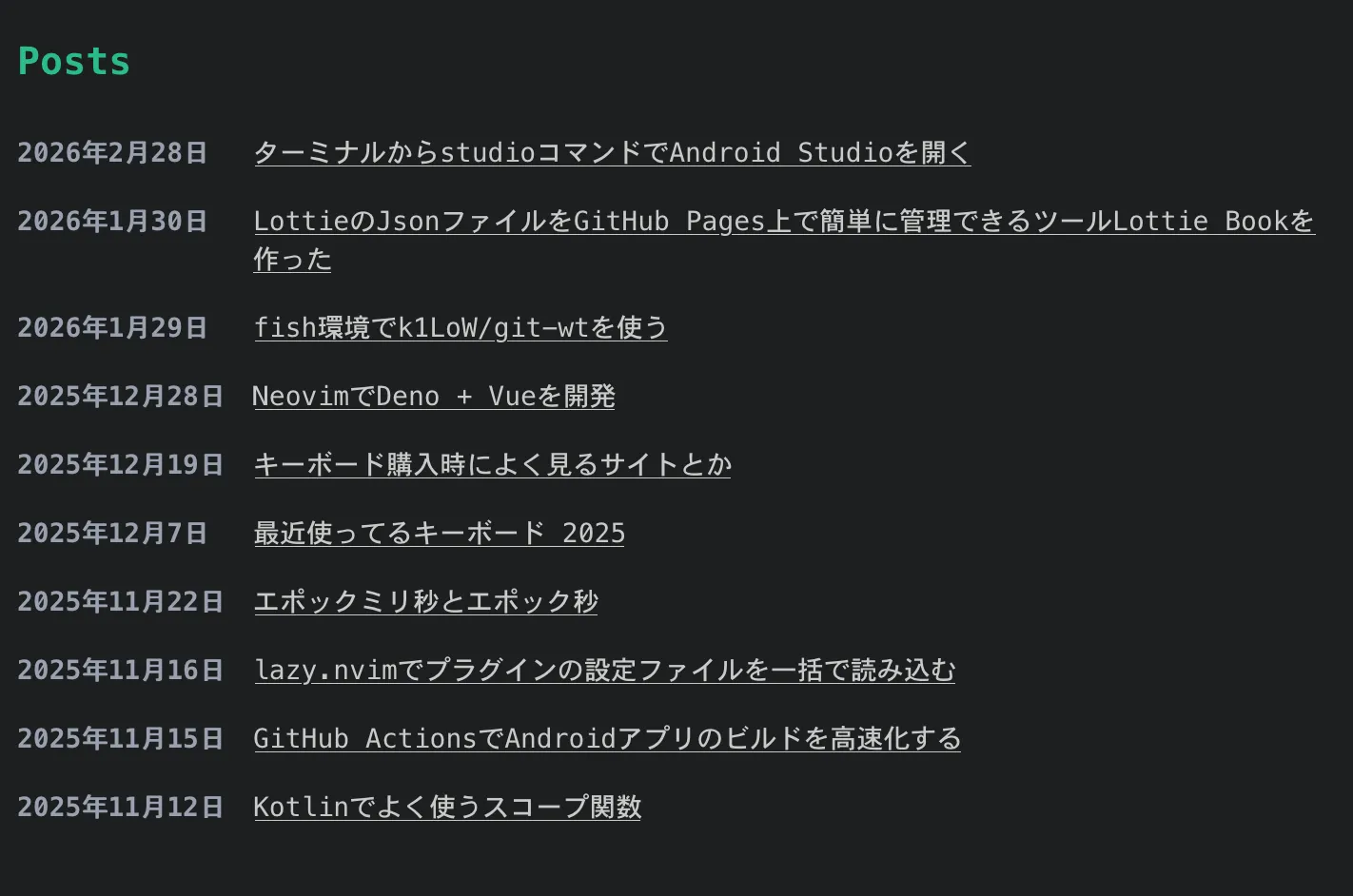 | 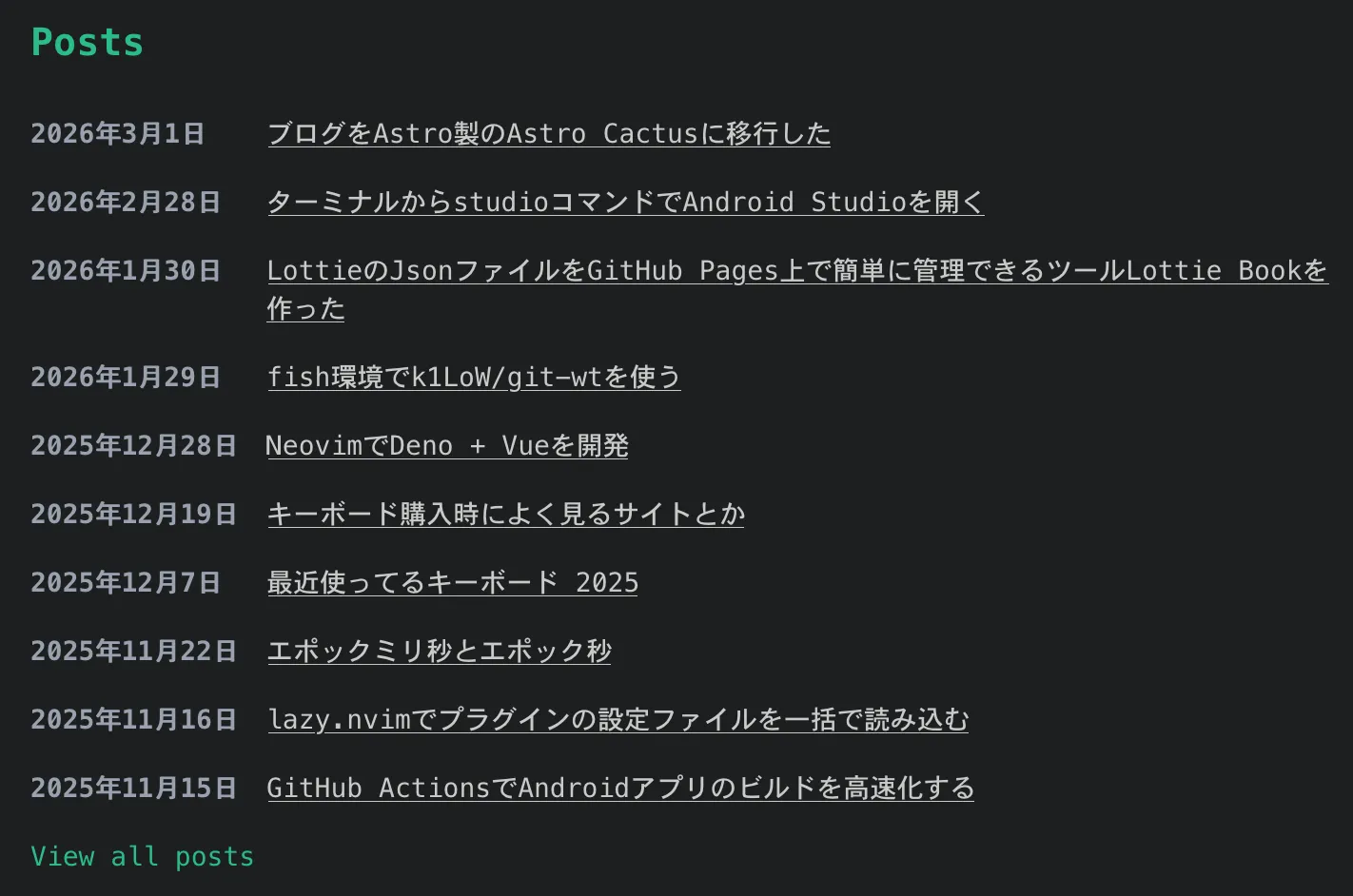 |
終わりに
ここで紹介した以外にもCloudflare Workersへのデプロイ設定も行なったので、そちらはまた今度にでも紹介できればと思います。
移行後、記事を書くモチベーションが上がってきたので、また投稿を増やしていきたいなと思います!