neotestでdocker compose上のRspecを実行してテスト結果をnvim上に表示
/ 6 min read
Updated:Table of Contents
はじめに
Railsで開発をするときはdocker compose + Rspecで開発をしています。エディタとしてはnvimを使っているのですが、毎回別タブに切り替えてコンテナ上でRspecを実行するのは面倒なのと、Rspecのコード上でどこのテストが落ちているか可視化できないのは不便だなと感じていました。
そこで、色々調べてみるとneotestというnvim上でテストを実行するためのプラグインを見つけました。neotest単体ではnvim上からテストを実行できなく、各テストライブラリ(Rspecやvitestなど)に応じたアダプタを追加することでnvim上からテストを実行できるようになるようです。
今回はRspecをnvim上から実行したかったのでneotest-rspecアダプタを使って実行できるしたので、紹介したいと思います。
neotestの設定
直接init.luaにベタ書きをすると、汎用性を持たせられないのでnvim-config-localを使ってプロジェクト固有のnvimの設定ファイルを使ってそこにneotestの設定を追加していきます。nvim-config-localの設定はこちらです。
neotestの設定です。プラグイン毎に設定ファイルを分割しています。
return { { "nvim-neotest/neotest", dependencies = { "nvim-neotest/nvim-nio", "nvim-lua/plenary.nvim", "antoinemadec/FixCursorHold.nvim", "nvim-treesitter/nvim-treesitter", "olimorris/neotest-rspec", "marilari88/neotest-vitest", }, config = function() require("neotest").setup({ adapters = { require("neotest-rspec"), require("neotest-vitest"), }, }) end, },}neotestの設定ファイルをinit.luaで読み込みます。
local neotest = require("plugins.neotest")
local plugins = {  neotest,}
require("lazy").setup(plugins)
nvim-config-localを使ったneotest-rspecの設定
neotestの設定をするRailsアプリはこちらです。
GitHub - Tatsumi0000/starry-kids: 入力した文字を月文字として生成するStarryKids🌝
nvim-config-localでは設定を追加したいプロジェクト直下に.nvim.luaファイルを作成します。今回はweb/backendに.nvim.luaを作成します。ほぼRADME通りです。
require("neotest").setup({  adapters = {    require("neotest-rspec")({      rspec_cmd = function()        return vim.tbl_flatten({          "docker",          "compose",          "exec",          "-it",          "backend",          "bundle",          "exec",          "rspec",        })      end,
      transform_spec_path = function(path)        local prefix = require("neotest-rspec").root(path)        return string.sub(path, string.len(prefix) + 2, -1)      end,
results_path = "tmp/rspec.output", summary = { follow = true, expand_errors = true, }, output = { open_on_run = true, }, }), },})Dockerコンテナ上でテストを実行するにあたり毎回docker compose run をするとコンテナの起動待ちが発生するのであらかじめdocker compose up -d で裏側で立ち上げておき、docker compose exec で起動中のコンテナの中に入ってテストを実行するようにしました。
テストの実行
nvimを**web/backend直下**でテスト対象のファイル開いて、:Neotest run を実行するとテスト結果が表示されます。右側のツリーは:Netotest summary で表示できます。
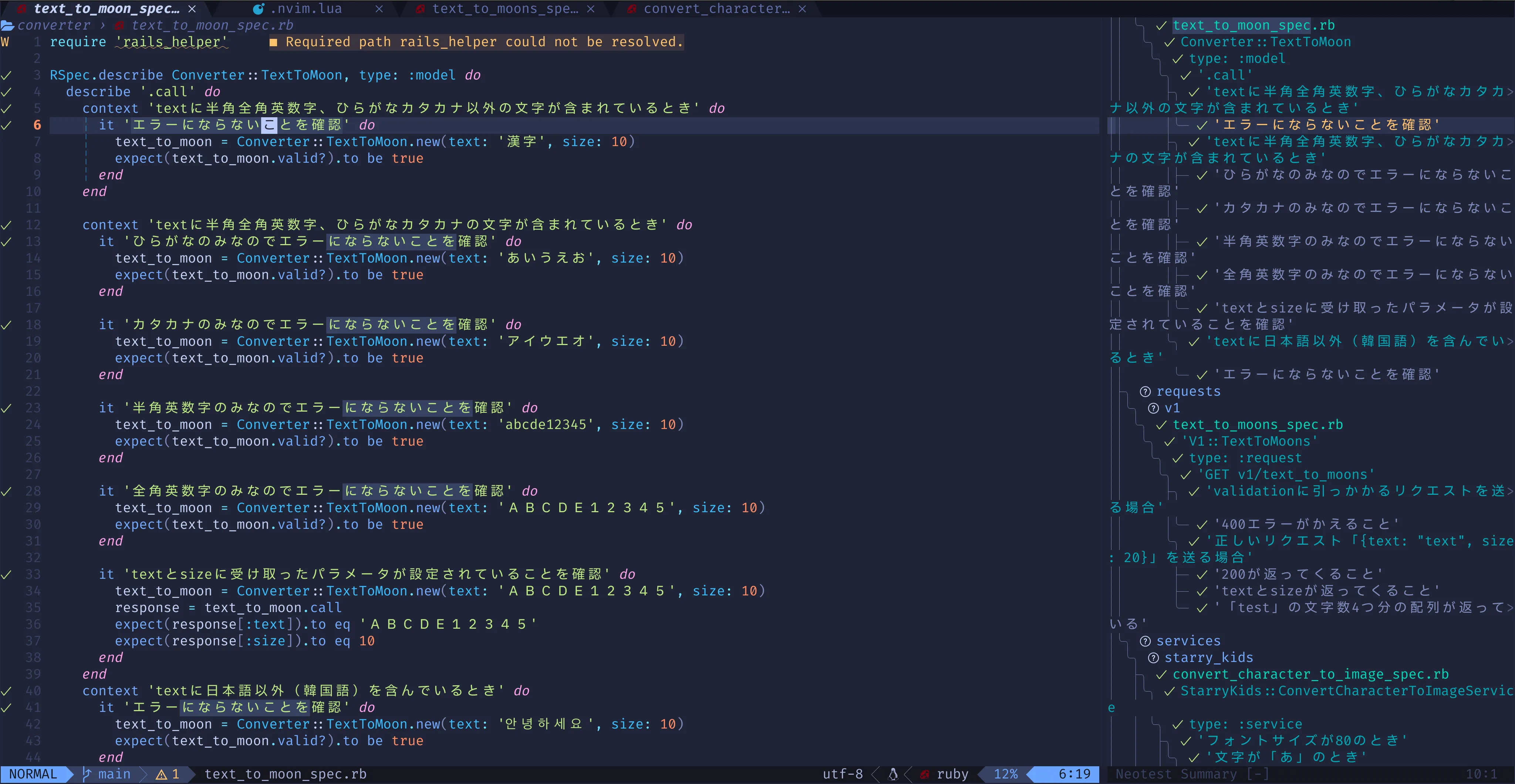
Neotest runの結果
困った点
今回サンプルとして使ったstarry-kidsはモノレポ構成です。最初はnvimを開く際に**web 直下**で開いていたのですが、テストの実行結果をうまく表示することができませんでした(エラー扱いになってバツマークを表示していました)。
どうやらrspec.output で出力するテスト結果のパスがwebを起点としたパスになっておらずweb/backend を起点としたパスになっていました。その結果、nvim上にテスト結果をうまく表示できないようでした。そのため、web/backend 直下で開く必要がありました。
Issueにもこの問題を書いている方がいらっしゃって気づきました。見た感じ頑張れば直せそうな気がするのですが、うまい案が浮かばずに諦めました…
終わりに
neotestとnvim-config-localを使ってDocker上のRspecを実行し、結果をnvim上に表示してみました。モノレポ構成特有の問題にハマって最初は動きませんでしたが、どうにか動かすことができました。
nvim-config-localも便利なので今後も個人的に使っていこうと思います。
参考文献
- nvim-neotest/neotest: An extensible framework for interacting with tests within NeoVim.
- olimorris/neotest-rspec: 🧪 Neotest adapter for RSpec. Works in Docker containers too
- klen/nvim-config-local: Secure load local config files for neovim
- [Bug]: Can’t run the rspec command in the correct directory in a monorepo · Issue #60 · olimorris/neotest-rspec